
 Split PDF
 Merge PDF
 Organize PDF
 Extract Pages
 Delete Pages
 PDF Multi Tool
 Compress PDF
 Repair PDF
 OCR PDF
 PDF to Word
 PDF to Excel
 PDF to PowerPoint
 PDF to Images
 PDF to JPG
 PDF to PNG
 PDF to WebP
 PDF to PDF/A
 Rasterize PDF
 Word to PDF
 Excel to PDF
 PowerPoint to PDF
 Images to PDF
 JPG to PDF
 PNG to PDF
 WebP to PDF
 PSD to PDF
 HEIC to PDF
 Markdown to PDF
 EPUB to PDF
 MOBI to PDF
 FB2 to PDF
 CBZ to PDF
 DJVU to PDF
 XPS to PDF
 ODT to PDF
 RTF to PDF
 TIFF to PDF
 Rotate PDF
 Add Page Numbers
 Add Watermark
 Crop PDF
 Form Creator
 Edit PDF
 Protect PDF
 Unlock PDF
 Sign PDF
PDF20 for Google Workspace
Open popular PDF20 tools quickly from a convenient Google Workspace sidebar.
PDF tools within easy reach
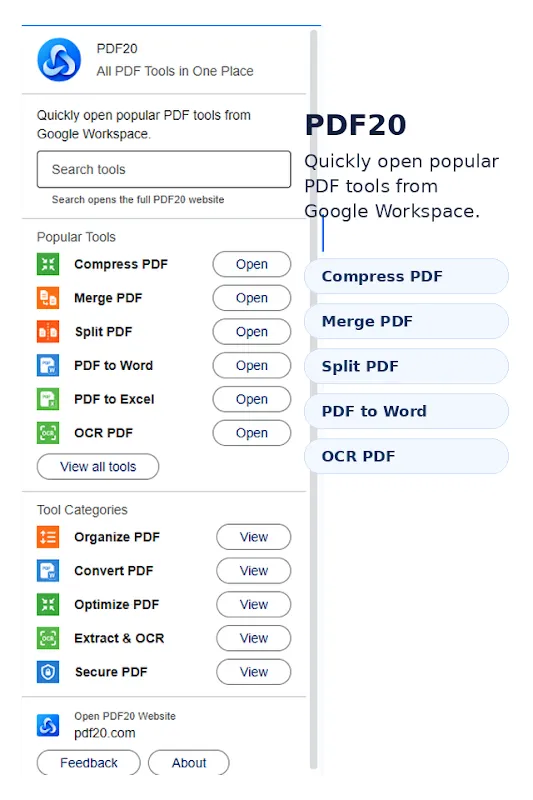
Open Compress PDF, Merge PDF, Split PDF, PDF to Word, PDF to Excel, OCR PDF, and other frequently used tools.
Find tools grouped under Organize PDF, Convert PDF, Optimize PDF, Extract & OCR, and Secure PDF.
Use the sidebar search to find the PDF workflow you need without browsing the full tool list.
Jump from the add-on to PDF20 when you want to explore every available PDF tool.
A convenient shortcut to PDF20
The Google Workspace add-on does not process files inside the host application. It opens the corresponding online tool on the PDF20 website, where you can complete the selected PDF task.
How to use PDF20 for Google Workspace
Open the Google Workspace Marketplace listing and install PDF20 for your account.
Launch PDF20 from the Google Workspace side panel when you need a PDF tool.
Select a popular shortcut, browse a category, or search for the required PDF workflow.
The selected tool opens on the PDF20 website so you can add files, adjust settings, and create the result.